
Updated
The top-of-book quote board
On forex, gold and silver, and futures, a bid and ask board above the ticket replaces the Level 2 montage.
Forex, metals and futures have no consolidated order book the desk could show honestly, so Order Entry opens with a quote board instead of a depth ladder: bid on the left, ask on the right, the spread between them.
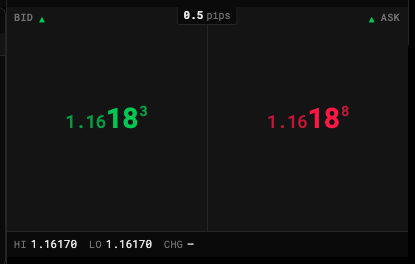
- Bid: where you sell
- Ask: where you buy
- Spread, in pips
- Session high, low and change
Reading it
| Part | Shows |
|---|---|
| Bid tile | The inside bid |
| Ask tile | The inside ask |
| Spread | Between the tiles — in pips on forex, gold and silver; in ticks on futures |
| ▲ / ▼ | The direction each side last moved |
| Strip underneath | The session’s Hi, Lo and Chg — and on futures, the Last print |
On futures each tile also shows its size (× 12), the contracts resting at that price.
Big digits, small digits
The board makes the part of the price that moves the largest:
- Forex — the pips are large, the big figure recedes, and the fractional pip sits raised and small, as on MetaTrader or cTrader.
- Gold, silver and futures — the whole number is large and the decimals trail small, the way the price is spoken (“fifty-six and a quarter”).
Click to load the ticket
Click the Bid tile to load that price into the ticket and arm Sell; click Ask to arm Buy. It never sends an order — you still press the button.
States
- Stale — a side that hasn’t changed for 15 replay seconds dims and says so.
- Closed — during a calendar break the tiles are disabled and the spread reads Closed.