
Updated
Measure price and date ranges
Price range, Date range and Date and price range count the real move, bars, time, volume and ticks between two points.
The Measurers live in the rail’s Forecasting and measurement group. Each is a box between two points you place.
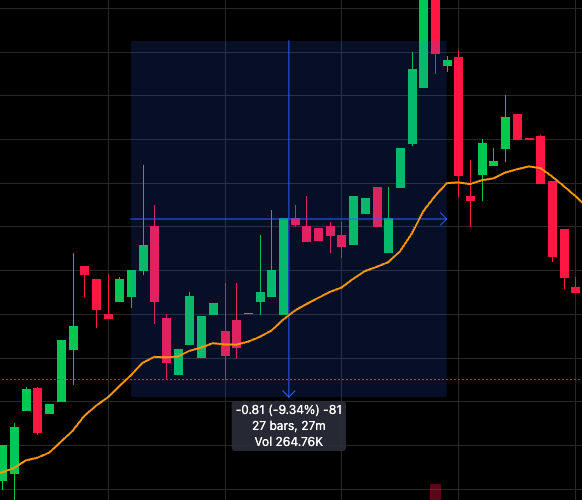
- The range you drew
- Price move, %, ticks · bars, time · volume
The three tools
| Tool | Reads out |
|---|---|
| Price range | The move, its percent, and the ticks it spans |
| Date range | Bars and elapsed time, and the volume traded |
| Date and price range | Both |
A Date and price range reads like this:
-0.75 (-8.73%) -75
29 bars, 29m
Vol 166.84K
That’s a 75-cent drop, 8.73% of the starting price, 75 one-cent ticks — over 29 one-minute bars with 166.84K shares traded.
Counted, not guessed
- Bars and volume are counted from the bars on the chart. Where there are none, only the elapsed time is shown.
- Ticks use the symbol’s own increment: sub-penny ticks under $1 on stocks, pips on forex.
- The readout stays on screen when the box runs near the edge of the chart.
Was this article helpful?
Related articles
- Drawing tools84 tools in six groups on the rail — how to find one, place it, and where to go next.
- Long and short positionsPlan a trade on the chart — entry, stop and target with P&L, size and risk:reward worked out from the real bars.
- Add indicators122 indicators on the stocks desk — search, star your favorites, and see which ones each desk offers.