
Long and short positions
Plan a trade on the chart — entry, stop and target with P&L, size and risk:reward worked out from the real bars.
Long position and Short position are in the rail’s Forecasting and measurement group. They’re planning drawings: nothing is sent to the market. To trade from the chart, see Trade from the chart.
Place one
Arm the tool and click once where you’d enter. The position appears with a stop and a target at 1:1, sized to what’s on screen: a red stop zone and a green target zone on either side of the entry.
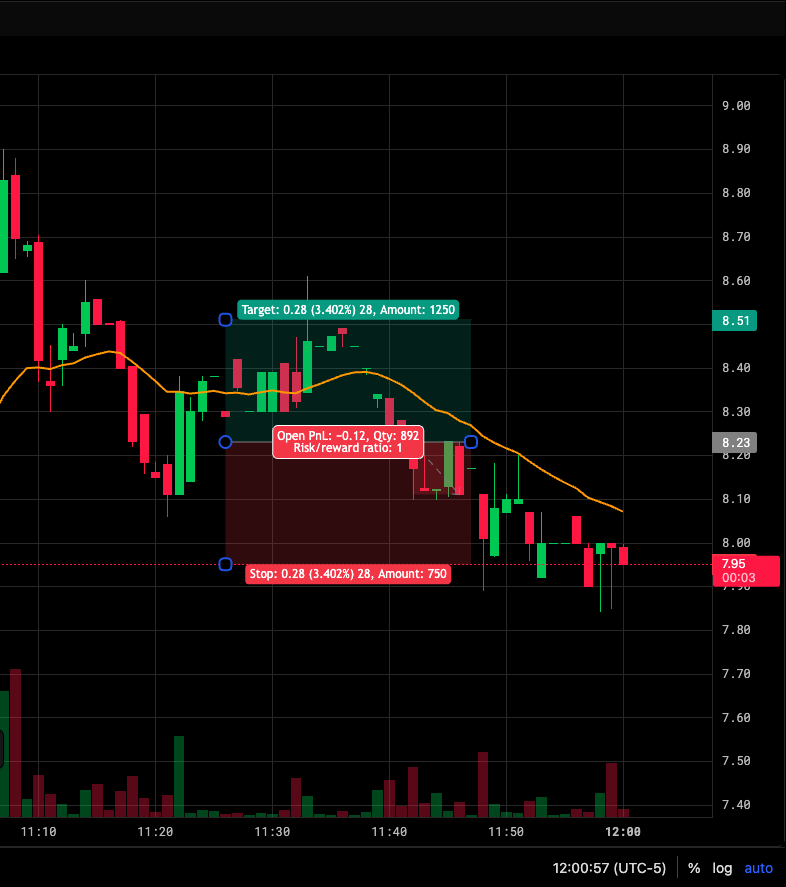
- Target: move, %, ticks, amount
- Open P&L, size, risk:reward
- Stop: move, %, ticks, amount
Adjust it
Select it and drag one of its four handles:
| Handle | Moves |
|---|---|
| Entry | The entry price — the stop and target come with it |
| Stop | The stop level |
| Target | The target level |
| Right edge | How far forward in time the trade runs |
Grab the body to move the whole position.
What it tells you
- On each level: price, percent, ticks and amount.
- Open P&L while the trade is live, Closed P&L once it hits the stop or target.
- Qty and the risk/reward ratio.
P&L is read from the bars actually on the chart. The trade is entered when a bar trades through the entry. After that, the first bar that reaches the stop or the target closes it — and a bar that reaches both counts as a stop-out, because from a bar alone you can’t rule the loss out.
Reverse
Right-click the position and choose Reverse. A long becomes a short on the same entry, with the stop and target mirrored.
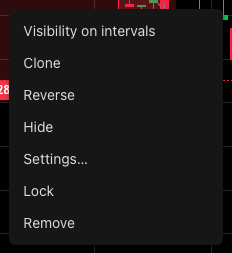
Settings
Double-click the position, or click Settings on the toolbar that appears when it’s selected.
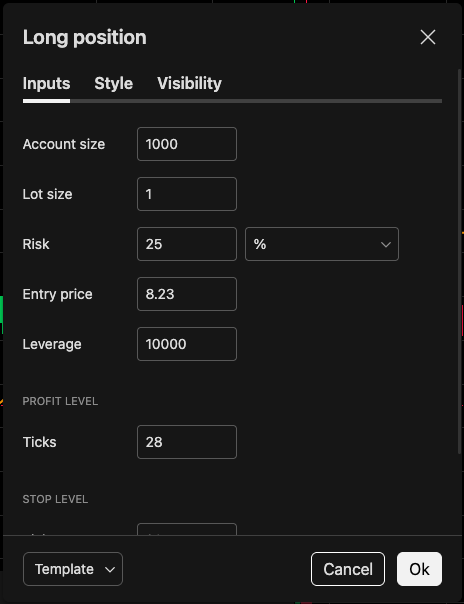
- Account size
- Risk per trade
- Target distance
- Stop distance
| Tab | What’s there |
|---|---|
| Inputs | Account size, Lot size, Risk (% or cash), Entry price, Leverage, Profit level and Stop level in ticks, Qty precision |
| Style | Line, stop and target colors, text, price labels, which stats the label prints, compact stats |
| Visibility | Which timeframes it shows on |
Qty is the size that risks your Risk setting between entry and stop, capped by Leverage × account size. The defaults are an account of 1,000 risking 25%, so set your own.
Was this article helpful?
Related articles
- Drawing tools84 tools in six groups on the rail — how to find one, place it, and where to go next.
- Measure price and date rangesPrice range, Date range and Date and price range count the real move, bars, time, volume and ticks between two points.
- Move, lock and remove drawingsSelect a drawing to restyle it, drag it by its body, lock it against edits, and clear the chart safely.