
Read the legend
The values under your crosshair, one row per indicator, and the buttons that hide, edit and remove each one.
The legend sits in the top-left of the price pane. An indicator in its own pane gets its own legend at the top of that pane.
What it shows
- Symbol row — the symbol, timeframe and exchange, with a pill for the session: premarket, open or after hours.
- O H L C and the bar’s change — for the bar under your crosshair, or the latest bar when the crosshair is off the chart.
- One row per indicator — its name, its inputs (e.g. EMA 9 close) and its values at the crosshair. The session VWAP reads VWAP rth.
With crosshairs synced across chart windows, each window’s legend reads its own bar at the shared time — a 1m and a 5m chart show different candles for the same moment.
Row buttons
Hover an indicator’s row to show its buttons.
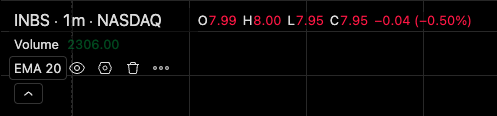
- Values under the crosshair
- Hide
- Settings
- Remove
- More
| Button | Does |
|---|---|
| Hide / Show | Takes the indicator off the chart without removing it |
| Settings (gear) | Opens its settings |
| Remove | Deletes it |
| More | Remove and Settings… |
The caret under the rows folds them away; it shows how many are hidden. The window remembers whether it’s folded.
Indicator settings
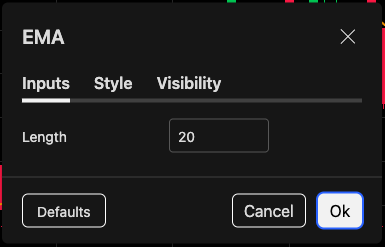
- Inputs: length
- Style: colors and lines
- Visibility
| Tab | What’s there |
|---|---|
| Inputs | Lengths, sources, anchors, bands — whatever the indicator takes |
| Style | Each line’s color, width and style |
| Visibility | Which timeframes it shows on |
Every change previews on the chart as you make it. Ok keeps it; Cancel puts the indicator back the way it was.
Choose what the legend prints
Settings → Status line in chart settings turns each part on or off: the title, market status, OHLC values, bar change, volume, and indicator titles, inputs and values. Volume is off by default.
Was this article helpful?
Related articles
- Add indicators122 indicators on the stocks desk — search, star your favorites, and see which ones each desk offers.
- Chart settingsCandle colors, the legend, price lines and the countdown, the canvas, and chart trading — the five tabs of the settings dialog.
- The chart windowThe toolbar, timeframes, the legend, the bottom bar and the drawing rail — where everything on a chart lives.