
Updated
Drawing hotkeys, magnet and favorites
Arm the common tools from the keyboard, snap anchors to the bars, and keep the tools you use on a strip.
Hotkeys
Hold Option (Alt on Windows) and press a letter to arm a tool on the chart under your pointer.
| Keys | Tool |
|---|---|
| ⌥+T | Trendline |
| ⌥+H | Horizontal line |
| ⌥+J | Horizontal ray |
| ⌥+V | Vertical line |
| ⌥+C | Crossline |
| ⌥+F | Fib retracement |
| ⌥+⇧+R | Rectangle |
The hint is printed beside each tool in the rail’s menus.
- They work on the chart your pointer is over, or the one you last clicked.
- They’re fixed: they don’t appear in Settings → Hotkeys and can’t be rebound.
- They’re ignored while you type in a text field, while a dialog or menu is open, and while the chart’s drawings are locked.
Magnet
The magnet pulls a drawing’s points onto a bar’s open, high, low or close.
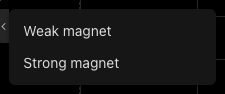
- Snaps within 12px of an open, high, low or close
- Always snaps to the nearest one
| Mode | Behaviour |
|---|---|
| Weak magnet | Snaps only when you’re already within 12 pixels of an open, high, low or close. A deliberate placement between them is left alone. |
| Strong magnet | Always snaps to the nearest open, high, low or close. |
Click the magnet button to switch it on (weak) or off. Choose strong from the arrow beside it.
Favorites
Star the tools you reach for and keep them one click away.
- Open a group from the rail and click the ☆ on a tool’s row.
- Click the star button on the rail (Show favorite drawing tools toolbar) to show the strip. It sits at the bottom-left of the chart.
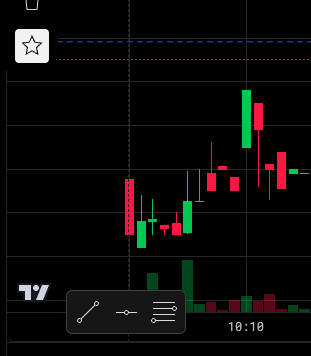
- Your starred tools
- Show or hide the strip
Click a tool on the strip to arm it. Empty, the strip reads Star a tool to keep it here.
Was this article helpful?
Related articles
- Drawing tools84 tools in six groups on the rail — how to find one, place it, and where to go next.
- Move, lock and remove drawingsSelect a drawing to restyle it, drag it by its body, lock it against edits, and clear the chart safely.
- Default hotkeysThe six trading bindings every account starts with, the chart key, and the drawing keys.