
Updated
Trade from the chart
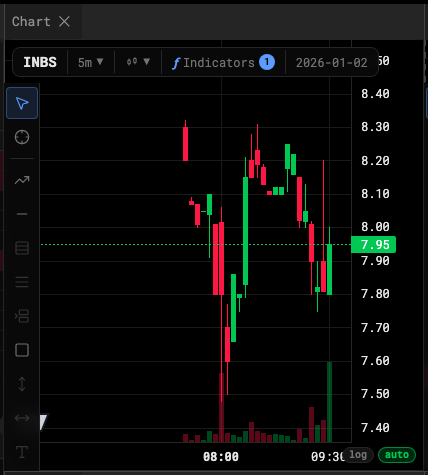
Arm an order with Option-click or Shift+O, drag it to price, and nudge working orders a tick at a time.
Place an order
- Hold Option (Alt on Windows) and click the chart where you want the price — or hover there and press Shift+O. An order pill appears at that price, sized from your Order Entry defaults.
- Drag the line up or down to adjust the price. On the pill, ⇅ flips the side, and the quantity and Type ▾ chips change size and order type.
- Click the Buy / Sell badge on the pill to submit. × discards it.
Neither gesture sends anything by itself; the badge is what you submit.
- Submit
- Order type
- Discard
A plain click on empty chart space doesn’t arm an order — it loads that price into the Order Entry ticket.
Working orders on the chart
Every working order draws as a line at its price, with its pill kept inside the price pane.
- Drag the line to modify the price. The desk cancels and replaces the order — a new latency draw and a new place in the queue, exactly as at a broker.
- Click a line to select it, then ↑ / → move it up one tick and ↓ / ← down one tick. Esc deselects.
- The × on the line cancels.
Turn it on or off
Right-click the chart for the Chart trading menu:
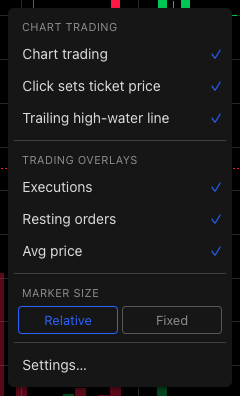
- Option/Alt-click arms an order
- A plain click prices the ticket
- Order lines on the chart
| Toggle | Default | Controls |
|---|---|---|
| Chart trading | On | Option-click and Shift+O |
| Trailing high-water line | On | The high-water mark a trailing stop is measured from |
| Click sets ticket price | On | Whether a plain click loads the ticket |
| Executions, Resting orders, Avg price | On | What’s drawn on the chart |
The same switches live on the Trading tab of chart settings. When you have working orders, the menu can also Cancel all Buy orders or Cancel all Sell orders.
Was this article helpful?
Related articles
- Place your first orderThe Order Entry ticket — size, price, type, and the four buttons.
- Default hotkeysThe six trading bindings every account starts with, the chart key, and the drawing keys.
- Chart settingsCandle colors, the legend, price lines and the countdown, the canvas, and chart trading — the five tabs of the settings dialog.