
Updated
Chart templates
Save a chart — timeframe, type, settings, indicators and drawings — by name, and load it onto any chart.
A template is one chart, saved under a name: its timeframe, chart type, chart settings, indicators and drawings. The button in the chart toolbar shows the template the window is on — Unnamed until you save one.
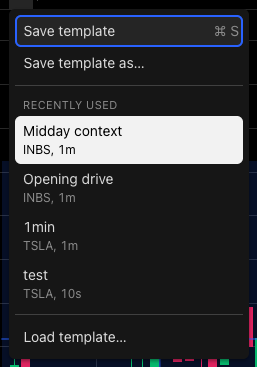
- Save (⌘S / Ctrl+S)
- Save under a new name
- Recently used
- Every template
Save
- Click the template name, or press ⌘+S (Ctrl+S on Windows) with the pointer over the chart. A window with no template asks for a name first; after that, Save overwrites it.
- Save template as… (from the arrow beside the name) saves a copy under a new name.
Saving also stores that symbol’s drawings on your account — see Drawings follow the symbol.

Dot = drawings not yet saved to your account
Load
The arrow menu lists your four most recently used templates. Load template… opens the full list.
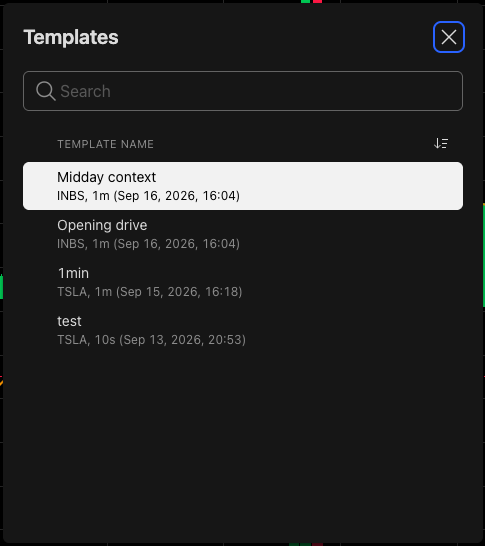
- Search
- Sort by name or date
- Click to load
- Search by name, and sort by name or date.
- ☆ keeps a template at the top of the list; ✕ deletes it.
- Click a name to load it.
The desk asks before a load would cost you something:
- Unsaved drawings. Loading replaces the chart’s drawings with the template’s.
- Another symbol. A template saved on one name can be loaded on another. Its drawings are moved onto the open symbol, at that symbol’s own prices.
What a template carries
| Carried | Not carried |
|---|---|
| Timeframe and chart type | Which symbol is open — loading never switches it |
| Every chart setting | Pane heights |
| Indicators | Magnet, lock-all and hide-all |
| Drawings | Forex Bid · Mid · Ask choice |
| Window size and position — that’s the layout |
Templates are saved to your account, so they follow you to another device. If the server can’t be reached the desk says Chart template saved on this device only.
Was this article helpful?
Related articles
- Drawings follow the symbolA drawing belongs to the ticker, not the day — where it's kept, and how it reaches your other devices.
- Save and load layoutsKeep more than one desk arrangement and switch between them.
- Add indicators122 indicators on the stocks desk — search, star your favorites, and see which ones each desk offers.